 Stanificent Global Technologies Ltd
Summary
Choosing the right business management software is essential for improving efficiency, managing daily operations, and supporting business growth. This guide explains how to evaluate software features, compare desktop and cloud deployment, assess security, scalability, reporting, and user management, while introducing STANIFICENT Enterprise Software and STANIFICENT Enterprise Cloud as professional solutions for modern organizations.
Running a successful business requires more than hard work—it requires the right technology. As businesses continue to grow and become more competitive, choosing the right business management software has become one of the most important decisions for improving productivity, streamlining operations, and supporting long-term growth.
Whether you operate a retail store, supermarket, pharmacy, wholesale business, distribution company, manufacturing firm, hotel, educational institution, or service-based organization, selecting the right software can significantly improve efficiency while reducing manual work.
This guide explains the most important factors to consider when choosing business management software and how to identify the solution that best fits your organization’s needs.
Call Us: 08131276307, 08077530865
Email: sales@stanificentcommerce.com
Office Address: 69/71 Mission Road, Opposite Cooke Road Junction, Benin City, Edo State, Nigeria.
What Is Business Management Software?
Business management software is an integrated system designed to help organizations manage essential business operations from one centralized platform.
Depending on the solution, it may include features such as:
- Customer Management
- Inventory Management
- Procurement Management
- Warehouse Management
- Sales & Invoicing
- User Management
- Business Reporting
- Backup & Restore
- Business Analytics
Rather than using separate applications for different tasks, businesses can manage their daily operations through one unified system.
Why Choosing the Right Software Matters
The right business management software helps organizations:
- Improve productivity
- Reduce repetitive manual work
- Organize business information
- Improve customer service
- Make informed business decisions
- Increase operational efficiency
- Support future business growth
Choosing the wrong software, however, can lead to operational challenges, unnecessary costs, and limited scalability.
Factors to Consider Before Choosing Business Management Software
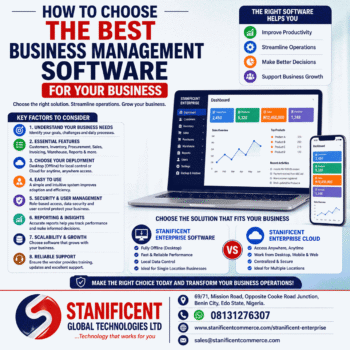
1. Understand Your Business Requirements
Every business is different.
Before selecting software, identify:
- Your industry
- Number of users
- Daily business processes
- Current challenges
- Growth plans
Software should support your business operations rather than forcing you to change how your business works.
2. Look for Essential Features
A good business management solution should include the tools your organization needs.
Common features include:
- Customer Management
- Inventory Management
- Procurement Management
- Warehouse Management
- Sales & Invoicing
- User Management
- Reporting
- Backup & Restore
Choosing software with the right features helps eliminate unnecessary complexity.
3. Consider Desktop or Cloud Deployment
One of the biggest decisions is whether your business needs offline desktop software or cloud-based software.
Desktop Business Software
Ideal for businesses that:
- Prefer offline operation
- Want fast desktop performance
- Operate mainly from one location
- Prefer local control over business data
Cloud Business Software
Suitable for businesses that:
- Require remote access
- Have multiple branches
- Support remote employees
- Need centralized online management
- Want access from supported desktop, mobile, and web environments
Understanding how your business operates will help determine which deployment model is most appropriate.
4. Evaluate Ease of Use
Software should be easy to learn and efficient to use.
Look for:
- Simple navigation
- Well-organized menus
- Clear reports
- Easy data entry
- Logical workflows
An intuitive system helps employees become productive more quickly.
5. Think About Business Growth
Your software should continue supporting your organization as it expands.
Consider whether it can accommodate:
- Additional users
- Increased inventory
- More customers
- Additional business locations
- Increased reporting requirements
Choosing scalable software reduces the need for major system changes later.
6. Security and User Management
Business information should be protected through appropriate access controls.
Look for software that includes:
- User accounts
- Role-based permissions
- Secure authentication
- Controlled administrative access
Cloud platforms may also include additional security features such as device authorization.
7. Reporting Capabilities
Business decisions depend on reliable information.
Choose software that provides reports for:
- Sales
- Inventory
- Customers
- Procurement
- Business performance
Effective reporting helps management identify trends and make informed decisions.
8. Data Backup
Business data is valuable.
A good solution should support reliable backup procedures to help protect important operational information.
9. Technical Support
Reliable technical support can help businesses resolve issues efficiently and maximize the value of their software investment.
Consider:
- Product documentation
- Software updates
- Customer assistance
- Training availability
10. Choose Software Built for Your Industry
Different industries have different operational requirements.
Choose software that aligns with your business sector, operational processes, and long-term objectives.
STANIFICENT Enterprise Solutions
Businesses looking for professional business management software can consider the STANIFICENT Enterprise solutions.
STANIFICENT Enterprise Software
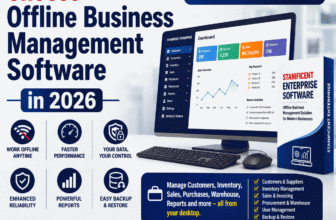
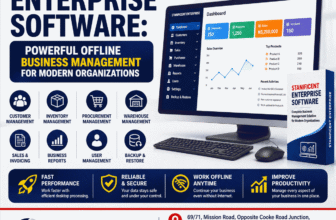
A fully offline desktop business management solution designed for organizations that prefer local installation and uninterrupted operation without continuous internet connectivity.
Features include:
- Customer Management
- Inventory Management
- Procurement Management
- Warehouse Management
- Sales & Invoicing
- User Management
- Business Reporting
- Backup & Restore
- Store Settings
- Recycle Bin
STANIFICENT Enterprise Cloud
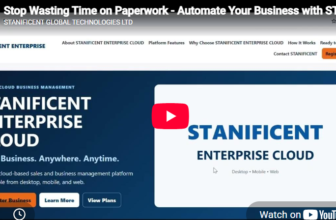
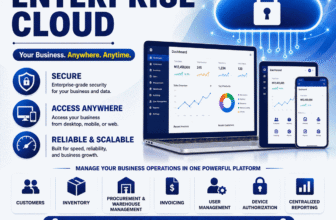
A cloud-based business management platform designed for organizations that require secure online access from supported desktop, mobile, and web environments.
Features include:
- Customer Management
- Inventory Management
- Procurement Management
- Warehouse Management
- Sales & Invoicing
- User Management
- Centralized Reporting
- Device Authorization
Both solutions are designed to improve operational efficiency while supporting businesses of different sizes and industries.
Why Businesses Choose STANIFICENT Enterprise
Organizations choose STANIFICENT Enterprise because it provides:
- Professional business management tools
- Integrated business operations
- Reliable desktop and cloud deployment options
- Customer and inventory management
- Procurement and warehouse management
- Business reporting
- User management
- Solutions suitable for growing businesses
About STANIFICENT GLOBAL TECHNOLOGIES LTD
STANIFICENT GLOBAL TECHNOLOGIES LTD is a technology company based in Benin City, Edo State, Nigeria. The company specializes in software solutions, website design and development, CCTV and security systems, electric fencing, hotel card locks, intercom systems, GPS vehicle tracking, solar and power solutions, networking equipment, and related technology services.
The company delivers innovative technology solutions that help businesses improve efficiency, security, and operational performance.
Contact Information
STANIFICENT GLOBAL TECHNOLOGIES LTD
Office Address:
69/71, Mission Road, Opposite Cooke Road Junction, Benin City, Edo State, Nigeria.
Call or WhatsApp:
08131276307, 08077530865
Conclusion
Selecting the best business management software requires careful consideration of your organization’s operational requirements, business goals, deployment preferences, and future growth plans.
Whether you choose an offline desktop solution like STANIFICENT Enterprise Software or a cloud-based platform like STANIFICENT Enterprise Cloud, investing in the right business management system can help improve efficiency, streamline operations, and support long-term business success.
Frequently Asked Questions (FAQs)
1. What is business management software?
Business management software is an integrated solution that helps organizations manage customers, inventory, procurement, invoicing, reporting, users, and other business operations.
2. Why do businesses need business management software?
It helps improve efficiency, organization, productivity, and decision-making.
3. What features should business management software include?
Customer management, inventory, procurement, warehouse management, invoicing, reporting, user management, and backup capabilities.
4. What is the difference between desktop and cloud business software?
Desktop software is installed locally, while cloud software is accessed online through supported devices.
5. Which is better—desktop or cloud software?
The best choice depends on your business requirements, operational workflow, and preferred deployment model.
6. Is offline software still relevant?
Yes. Many organizations continue to use offline software for reliability and uninterrupted operations.
7. Why do businesses choose cloud software?
Cloud software supports remote access, centralized management, and online collaboration.
8. What industries benefit from business management software?
Retail, wholesale, manufacturing, hotels, healthcare, education, pharmacies, distribution, and service businesses.
9. Can small businesses use business management software?
Yes. Many solutions are suitable for small and medium-sized businesses.
10. What is inventory management?
It is the process of tracking and managing stock levels and inventory movements.
11. Why is customer management important?
It helps businesses organize customer information and improve service delivery.
12. What is procurement management?
It helps businesses manage purchasing activities and supplier transactions.
13. Why are business reports important?
Reports provide insights that support informed business decisions.
14. Does business management software support multiple users?
Yes. Many solutions include user management and role-based permissions.
15. Can business management software grow with my business?
Many modern solutions are designed to support business growth and expansion.
16. What is STANIFICENT Enterprise Software?
It is a fully offline desktop business management solution.
17. What is STANIFICENT Enterprise Cloud?
It is a cloud-based business management platform.
18. Can businesses migrate from STANIFICENT Enterprise Software to STANIFICENT Enterprise Cloud?
Yes. Businesses can migrate from STANIFICENT Enterprise Software to STANIFICENT Enterprise Cloud. Migration is subject to the migration procedures, software versions, compatibility, and supported options available at the time of migration.
19. Which STANIFICENT Enterprise solution should I choose?
Choose STANIFICENT Enterprise Software if you prefer offline desktop operation, or STANIFICENT Enterprise Cloud if you require secure online access and remote collaboration.
20. Where can I learn more about STANIFICENT Enterprise solutions?
You can contact STANIFICENT GLOBAL TECHNOLOGIES LTD using the contact details above or visit the STANIFICENT Enterprise product pages on www.stanificentcommerce.com/stanificent-enterprise for additional information.